


Related settings of fiber laser welding machine

The problems that occur during laser welding are often not caused by the equipment itself, but by improper parameter settings. The various settings of welding equipment directly affect the strength, quality, and cleanliness of the weld seam. In order to fully utilize the performance of fiber laser welding machines, precise and reasonable parameter configuration is required.
What are the settings on a welder?
When your welds don’t look right, feel right, or last long enough—it’s often because your settings aren’t optimized.
On a fiber laser welding machine, the key settings include laser power, welding speed, spot size (or focal diameter), and pulse characteristics. Each plays a specific role in defining weld quality.
Let’s break it down
1. Laser Power
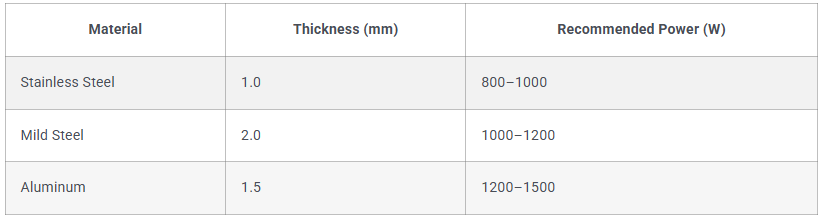
Laser power determines the amount of energy delivered to the material. More power doesn’t always mean better. Too much can overburn. Too little can create weak joints. When we onboard a new customer at Kirin Laser, our first step is matching power to material.
2. Welding Speed
Speed is how fast the laser head moves along the seam. If it’s too fast, the weld may be incomplete or weak. If too slow, it may cause burn-through or deformation. Speed must match power. For example, a 1500W laser on 1mm stainless steel might run at 20–30 mm/s for an optimal weld.
3. Focal Spot Size
The smaller the focal point, the more concentrated the energy. This gives deeper penetration and narrower welds. But a too-small focus can cause instability. The sweet spot depends on your joint geometry. We help customers fine-tune this using beam alignment tools and trial welds.
4. Pulse Mode vs Continuous Wave
For fine, cosmetic welds or thin metals, pulse mode gives better control. Continuous wave is faster and better for deep welds. The setting matters. One customer switched from pulse to CW for their carbon steel tubes and reduced their cycle time by 35%.
How should you adjust the welding machine settings?
It’s not guesswork. Every adjustment you make should have a purpose.
Adjusting your fiber laser welding machine means balancing power, speed, and focus to match your material and joint design. You don’t want to over-melt or under-penetrate.
Here's how I approach it
1. Material First
Every setting depends on the material. Stainless steel behaves differently than aluminum. Aluminum reflects more laser energy, so we usually need more power and precise pre-cleaning.
2. Trial Welds Are Key
Before going into production, we do at least 3–5 test welds with small variations. We document the seam quality, penetration, and spatter level. Then we choose the best setting. It’s not about “feel”—it’s about data2.
3. Watch the Seam
If your seam is too wide, reduce power or increase speed. If it's narrow but cracked, you may be moving too fast. If you see undercut, check your focus position. I always recommend a real-time camera setup3 to monitor the weld zone—especially for automation.
What is the current setting in welding?
Many people ask me—what's the “current” in fiber laser welding? Isn’t it like arc welding?
In fiber laser welding, we don’t use electric current like in arc or TIG welding. Instead, we use optical power, measured in watts (W), as our energy source.
Important distinctions of fiber laser welding
1. No Amps, Just Watts
Arc welding uses current (amperes) to generate heat. Fiber lasers use a high-powered beam of light. That beam is measured in watts, not amps. So when someone says “what’s your current setting?”, they probably mean laser power.
2. Pulse Frequency = Control
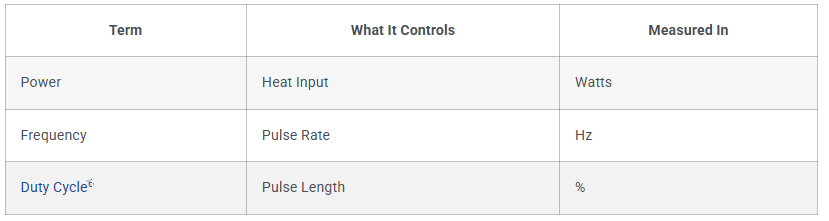
Though there’s no current, we do have a frequency setting—measured in Hz. This controls how often pulses fire in pulsed mode. A lower Hz means fewer, stronger pulses. A higher Hz smooths out the weld. On 0.8mm stainless, I often start at 100Hz and tweak from there.
3. Duty Cycle = Energy per Pulse
The duty cycle (%) tells us how long the laser stays on per pulse cycle. A 50% duty cycle at 100Hz gives half-on, half-off pulses. It’s another lever to manage heat input without overmelting.

你对这篇帖子有什么看法?欢迎在评论区分享。







