


Experience sharing in selecting RuiDa controllers for your CNC machine tools

When choosing a suitable Ruida laser controller for your laser cutting or engraving machine, the first thing to consider is compatibility with the laser type (such as CO2, fiber, or hybrid laser). In addition, the type of control interface (such as LCD or touch screen) and software compatibility (such as RuidaDraw, LaserWork, or third-party software) are also very important. For most users, the ideal Ruida laser controller should have performance, ease of use, and firmware stability. For example, the RDC6445G and RDC6442S models are typically recommended for mid-range CO2 laser systems due to their reliable communication performance and real-time monitoring capabilities. For high-power fiber lasers, the RDC6345G controller is a good choice as it supports dynamic focus control and higher pulse frequencies. Finally, before purchasing, it is necessary to confirm the voltage requirements, the number of I/O ports, and ensure that the latest firmware updates are available.
1、About Ruida Laser Controller
Ruida Technology is a leading Chinese manufacturer specializing in motion control systems for industrial laser equipment. Their controllers are widely adopted in desktop and industrial-grade laser cutters and engravers globally. A Ruida laser controller typically manages stepper or servo motors, laser power modulation, auxiliary devices (like air blowers or rotary attachments), and user interface functions.
These units are commonly found in:
CO2 laser cutters (e.g., 40W–150W machines)
Fiber laser markers (for metal engraving)
Dual-laser hybrid systems
Large-format CNC laser platforms
They support various input methods, including USB drives, Ethernet connections, and wireless modules (on select models), allowing offline operation without constant PC connection—a major advantage for production environments.
2. Why Ruida Laser Controller Is Gaining Popularity
The growing adoption of Ruida controllers stems from their balance of affordability, functionality, and widespread community support. Unlike proprietary OEM boards, Ruida offers standardized firmware across models, enabling easier troubleshooting and upgrades. Additionally, many open-source and commercial laser software tools now include native support for Ruida protocols.
Users switching from older DSP controllers or Mach3-based systems report improved responsiveness, smoother acceleration curves, and better laser power control. Their plug-and-play nature appeals to both hobbyists and small manufacturers looking to upgrade legacy machines without full rebuilds.
3.Types and Variants
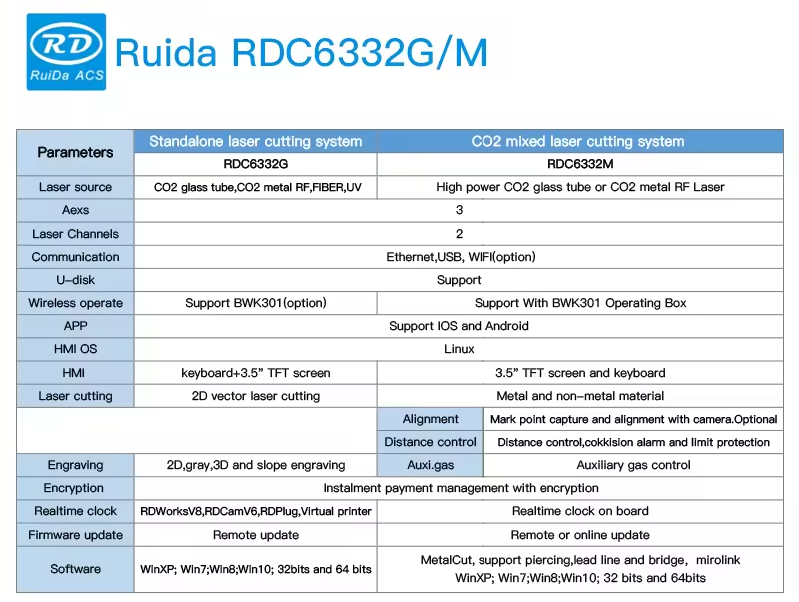
Ruida offers several controller families tailored to different laser types and performance levels. Understanding these variants helps avoid compatibility issues.
RDC63xx Series (Fiber & MOPA Lasers)
Built for fiber laser markers using scan heads, such as the RDC6332G and RDC6345G.
Pros: High pulse frequency support, dynamic focus control, compatible with galvanometer mirrors.
Cons: More expensive; requires specialized tuning knowledge.
RDC64xx Series (CO2 Lasers)
Designed for standard CO2 tube lasers up to 150W, this series includes popular models like the RDC6442S and RDC6445G.
Pros: Affordable, excellent software integration, real-time status display, supports rotary axis control.
Cons: Limited to lower-frequency PWM signals; not suitable for high-speed galvo systems.
RDC65xx Series (Hybrid & High-Power Systems)
Advanced controllers like the RDC6510G support dual-laser setups (CO2 + fiber) and networked operations.
Pros: Multi-axis support, Ethernet/Wi-Fi connectivity, remote monitoring.
Cons: Complex setup; overkill for basic engraving tasks.
4.Key Features and Specifications to Evaluate
To ensure optimal performance, assess the following technical aspects before buying a what to look for in Ruida laser controller model:
Laser Type Compatibility
Confirm whether the controller supports your laser source. CO2 systems use analog or TTL modulation, while fiber lasers require high-frequency digital pulses. Using a CO2-optimized board on a fiber laser can result in poor mark quality or hardware damage.
Control Interface
Choose between LCD keypad panels and color touchscreen interfaces. Touchscreens (e.g., RDC6445G) offer faster navigation and visual feedback but may be more fragile in dusty workshops.
Software Support
Check compatibility with your preferred software: RuidaDraw, LaserWork, LightBurn (via plugins), or RDWorks. Some newer versions offer API access for custom integrations.
Communication Options
USB-only models limit flexibility. Controllers with Ethernet, Wi-Fi (optional), or SD card slots allow standalone operation and network deployment.
I/O Ports and Expandability
Ensure sufficient input/output ports for accessories: limit switches, foot pedals, air assist, rotary encoders, or exhaust fans. Industrial applications often need relay outputs for automation.
Firmware Updates
Regular firmware updates fix bugs and add features. Verify if the manufacturer provides official update tools and changelogs.
5.Pros and Cons
Advantages
Wide compatibility: Works with many laser brands and frame sizes.
Offline operation: Run jobs directly from USB or network without a connected PC.
User-friendly UI: Intuitive menus reduce training time.
Strong community support: Active forums and video tutorials available.
Limitations
Language barriers: Default interface may be in Chinese; English firmware varies by vendor.
Firmware fragmentation: Third-party resellers sometimes modify firmware, causing instability.
No built-in safety interlocks: Requires external wiring for emergency stops or door sensors.
Voltage sensitivity: May fail under unstable power supplies; use a regulated 24V DC source.
6. How to Choose a Ruida Laser Controller
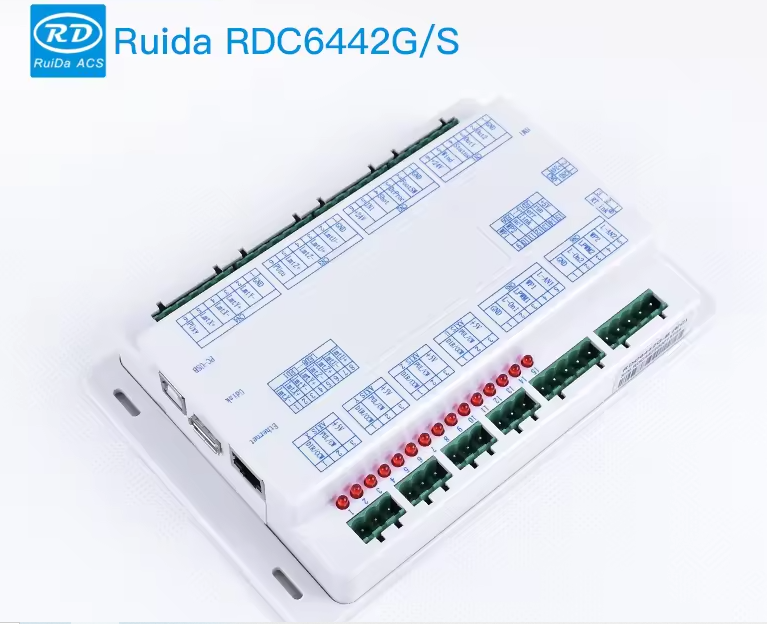
Follow this step-by-step process to select the right model:
Determine your laser type: CO2? Fiber? Hybrid? Match the controller series accordingly.
Assess power requirements: Higher wattage lasers may need enhanced cooling and stable drivers.
Evaluate software workflow: If using LightBurn, confirm plugin availability and version compatibility.
Check physical dimensions: Ensure the control box fits within your machine cabinet.
Verify I/O needs: List all peripherals requiring connection (rotary stage, sensor, etc.).
Review update policy: Ask the supplier about firmware update procedures and rollback options.
Avoid counterfeit units: Purchase from authorized distributors or verified sellers with return policies.
Red flags to watch for:
Unusually low prices suggesting cloned hardware.
Lack of documentation or English manuals.
No technical support contact or warranty information.
Inconsistent labeling or poor soldering visible in product images.
7. Price & Market Insights
Pricing varies significantly based on model, region, and seller authenticity.
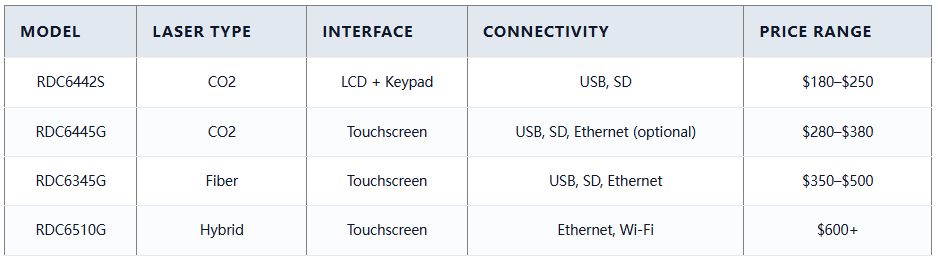
Entry-level (RDC6442S): $180–$250 — ideal for DIY or light-duty use.
Mid-range (RDC6445G): $280–$380 — best value for professional CO2 systems.
Fiber-specific (RDC6345G): $350–$500 — justified by advanced timing control.
Premium (RDC6510G): $600+ — suited for automated production lines.
Prices on marketplaces like AliExpress may be lower but carry risks of outdated firmware or no after-sales service. Buying through regional distributors (e.g., in Europe or North America) often includes localized support and compliance testing.
8. Top-Seller & Competitive Analysis
The RDC6445G remains the most popular choice among users upgrading 60W–130W CO2 laser cutters. Its color touchscreen and Ethernet option provide modern usability at a reasonable cost. In comparison, the older RDC6442S lacks visual feedback but remains reliable for budget builds.
The RDC6345G stands out in fiber laser applications due to its nanosecond-level pulse control, essential for clean metal marking. However, improper parameter settings can lead to inconsistent results, so operator training matters.
When comparing brands, Ruida dominates the mid-tier market. Alternatives like Trocen or Syntec exist but have smaller user bases and less third-party software support.
9.Customer Feedback Synthesis
Analysis of hundreds of reviews from forums, Alibaba, and Reddit reveals consistent patterns:
Common Praises:
“Much smoother cutting than my old motherboard.”
“The touchscreen makes job selection so easy.”
“Stable performance after firmware update.”
“Great for running long jobs unattended.”
Recurring Complaints:
“Arrived with Chinese menu only—had to find firmware online.”
“One unit failed after two months—possibly power surge related.”
“Support email never replied.”
“Instructions were missing or poorly translated.”
These highlight the importance of sourcing from reputable vendors who pre-install English firmware and offer responsive service.
10. Conclusion
Selecting the right best Ruida laser controller involves matching technical specs to your machine type and usage goals. For most CO2 laser users, the RDC6445G offers the best blend of usability, reliability, and price. Fiber laser operators should opt for the RDC63xx series, while large-scale or hybrid setups benefit from the RDC65xx line. Prioritize genuine units with updated firmware, adequate I/O, and trusted supplier support. By carefully evaluating your needs against specifications—and avoiding red-flag sellers—you’ll maximize uptime and precision in your laser operations.

Wat vind je van dit bericht? Deel je mening in de reacties.





I am using Ruida's controller
This is an excellent guide. I purchased Ruida's CQ2 series controller, and at the time, many aspects were unclear to me. If I had seen this article back then, it would have been immensely helpful.
Very detailed purchasing advice