


LASCAD: How to Simulate a Passively Q-Switched Laser

The steps described below can also be performed using the demo version of LASCAD.
Use the attached file Tutorial_1.lcd as the input for LASCAD.
Since Tutorial_1 cannot be opened directly, the FEA code needs to be run. To do this, it is recommended to open the FEA window and click "Apply & Run FEA". For more information on FEA, Tutorial_1 can be referred to. In the case of pulsed pumping, the input incident pump power refers to the average incident power. See Section 7.7.4 "Pump Modes" in the manual.
Perform parabolic fitting to insert the thermal lens.
Click "Dynamic Multimode Analysis" in the LASCAD main menu, and open the DMA GUI with "Default Configuration".
Enter 0 in "Maximum Mode Order"
Enter 3.5 in "Stretch Factor in …"
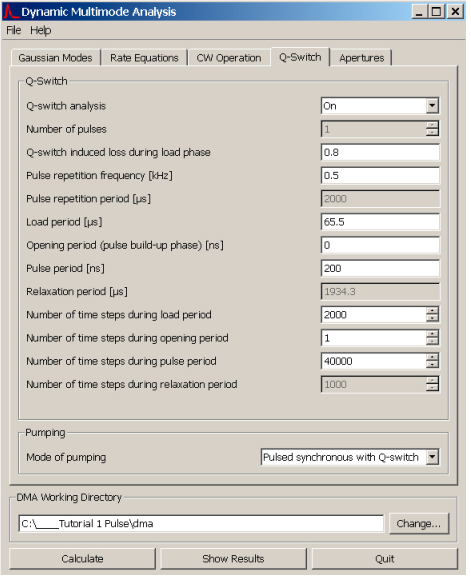
Open the Q-switch tab and modify the entries according to the picture on page 1. The load period must be adjusted according to the experimental conditions to match the time interval between the start of the pump pulse and the turn-on time of the Q-switch.
Click "Calculate".
Click "Show Results" to open the DMA Viewer.
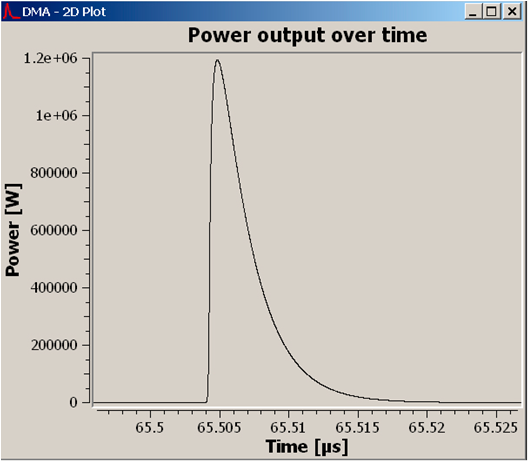
Click "2D - Power output over time", and the pulses will be displayed as vertical lines.
To increase the time scale, drag a rectangular red box with the mouse to enclose the vertical lines.
The pulse shape is shown in the following figure:

Cosa ne pensi di questo post? Condividi la tua opinione nei commenti.







