


Feature Request: Custom Text for Layer Colors in RDWorks

Subject: Request to Add Custom Text/Tooltip for Layer Colors
Dear RDWorks Development Team,
I would like to request a useful feature for RDWorks.
Please add an option that allows users to assign custom text to each layer color.
For example:
- Black →
MDF 5mm Black - Red →
MDF 4mm Red - Blue →
MDF 3mm Blue - Green →
MDF 2mm Green - Yellow →
MDF 1.5mm Yellow
The user should be able to type their own text next to each color.
When the mouse pointer is moved over a layer color, the custom text entered by the user should appear as a tooltip.
Purpose
I use different layer colors for different MDF materials, colors, and cutting/engraving settings. For example, I may use:
Red = MDF 3mm Cutting
Blue = MDF 6mm Cutting
Green = MDF Engraving
With this feature, I can immediately identify what each layer color represents without having to remember it.
Please consider adding this feature to a future version of RDWorks.
Thank you for your time and consideration.
Best regards,
RDWorks User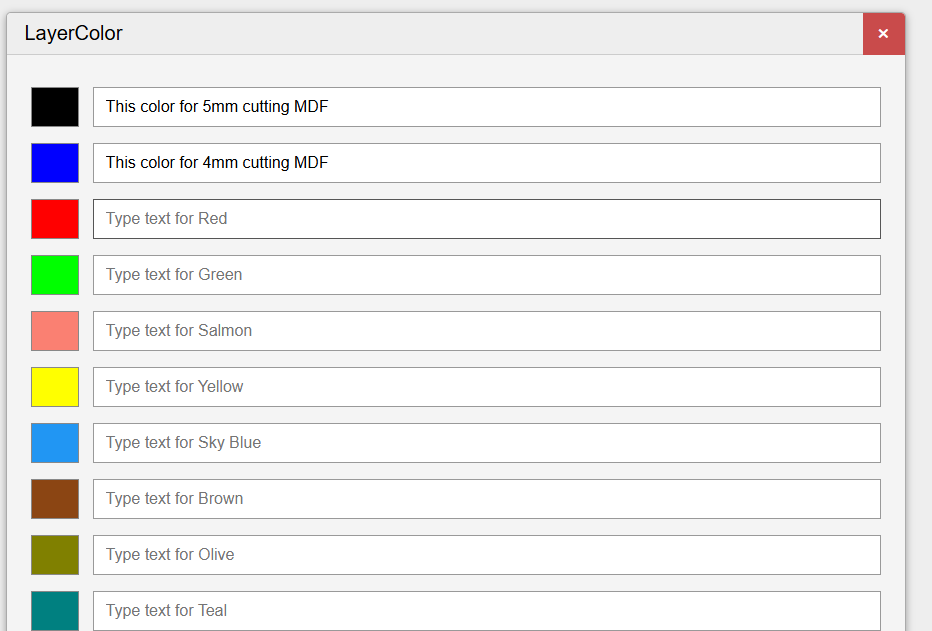

¿Qué opinas de esta publicación? Comparte tu opinión en los comentarios.








Although I don't have such a usage scenario yet, I feel that your idea is great
Your suggestion is great! I will pass it on to our product manager. Thank you for your support of the RD product!
appear as a tooltip.